Upgrade from Version 1 to Version 3
 Updated
by
PolicyMap
Updated
by
PolicyMap
Upgrade from v1 to v3
PolicyMap for Salesforce v3 required major architectural changes. For this reason, it’s not possible to upgrade from v1 to v3. Instead, it will require a clean install, followed by re-configuration and re-import. We understand that this is very inconvenient, and are committed to providing a seamless upgrade experience in future versions.
What has changed?
- Support for almost* all Standard and all Custom objects.
Version 1 allowed you to import PolicyMap data Accounts, Contacts, and Leads. The PolicyMap map page would display these object records as well as Opportunities.
Version 3 allows you to import PolicyMap data for almost* any standard or custom object that contains either an Address or Location field. In addition, you can select other objects to display PolicyMap data associated with a related record. For instance, you may import data for Account fields, and display that data for related Opportunies. - Support for Geolocation type fields.
Version 1 supported Address fields.
Version 3 also supports Geolocation fields, as well as Geolocation data in Address fields. - The PolicyMap Record Locator component.
Version 1 offered a separate locator component for Account, Contact, Lead, and Opportunity records.
Version 3 has one component that will work for record pages across all objects you have enabled in Settings, including custom object records. - The PolicyMap Index Card component.
Version 1 offered one PolicyMap Data component for Account, Contact, and Lead records, and a separate component, PolicyMap Related Record Data to display data on other record pages, and this component required configuration to display the desired location data.
Version 3 has one component that displays the data for the appropriate location as configured in Settings. - The PolicyMap Data object.
Version 1 stored PolicyMap data in a separate object for Account, Contact, and Lead records.
Version 3 stores PolicyMap data in a single object, with each record relating to the record that provided its location.
Upgrade steps:
- Note current configuration.
Because this upgrade requires an uninstall/reinstall, you will lose your configuration and uploaded data. You will need this information later.
- Make a note of which objects you have enabled for PolicyMap, as well as selected location field and filters (if applicable).
- Make a note of which PolicyMap data fields you have imported.
- Note any reports you may have created; they will have to be re-created.
- Remove dependencies.
- Remove PolicyMap components from lightning page layouts. On every record page that contains a PolicyMap component, enter Edit Page and remove the components and any items, such as tabs, that have display filtered for the PolicyMap_Access permission.
The Record Locator component can occasionally appear as a blank line in the Edit Page. Double-check each Page and section and delete all blank components.
- Remove reports that you may have created.
- Uninstall PolicyMap for Salesforce.
- Delete old components from your org. In Setup, find the page Lightning Components. Delete the following components:
- PolicyMap Data (pmData)
- PolicyMap Related Record Data (pmRelatedObjectData)
- PMAccountLocator
- PMContactLocator
- PMLeadLocator
- PMOpportunityLocactor
- Install PolicyMap for Salesforce (latest version).
- Manage application access.
- Manage access to the PolicyMap Services app. From Setup, in the Quick Find box, enter External Client, and then select External Client App Manager.
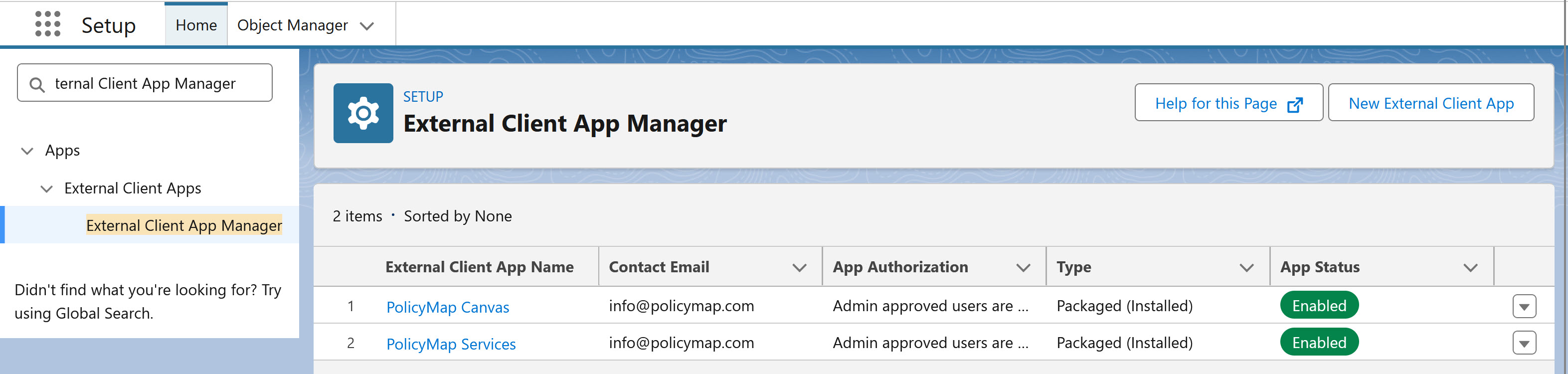
- From the list, select PolicyMap Canvas, select Edit Policies.
- Under Select Permission Sets, select and move PolicyMap User AND PolicyMap Admin to the right.
- Under OAuth Policies, from the Permitted Users dropdown, select Admin approved users are pre-authorized.
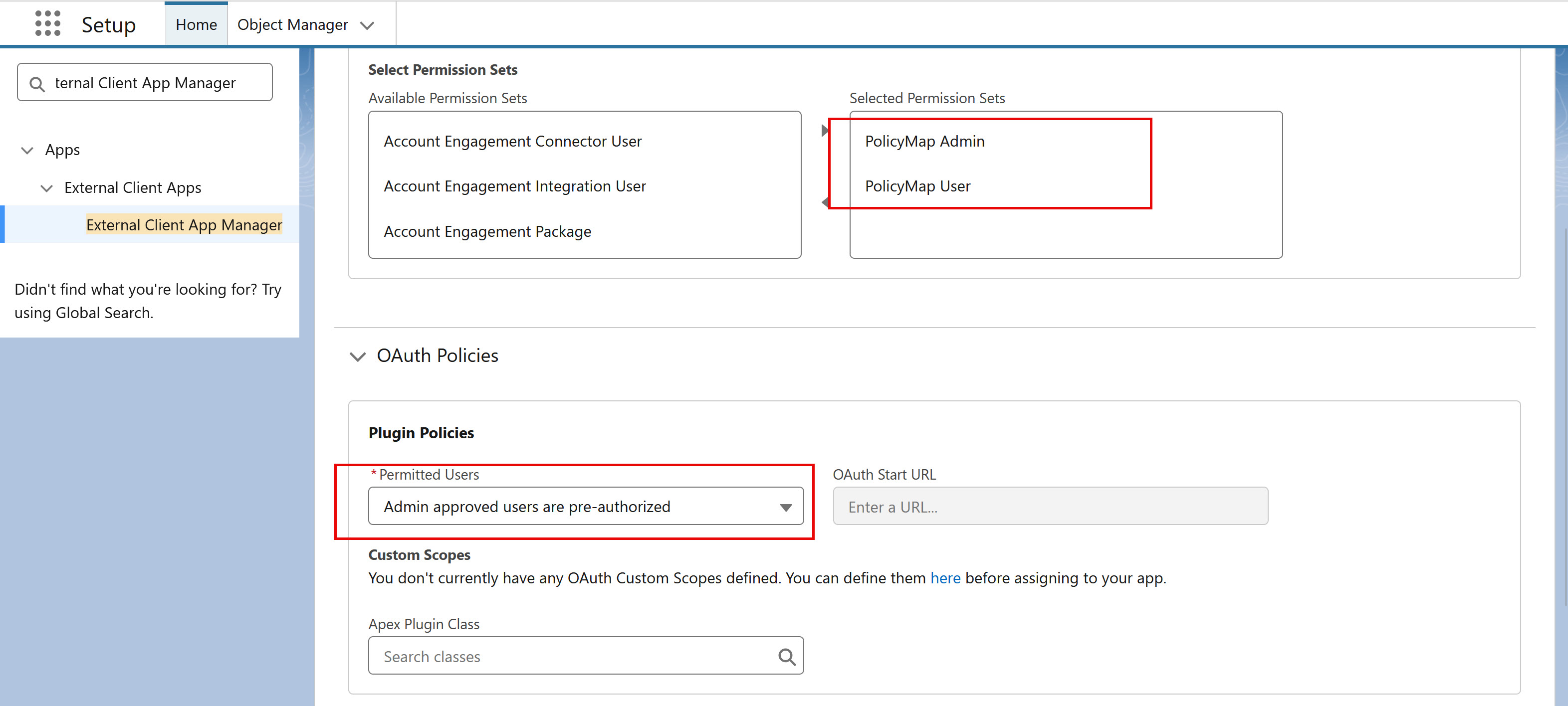
- Confirm the changes and save.
- From the list for PolicyMap Services, select Edit Policies.
- Under Select Permission Sets, select and move PolicyMap Admin to the right.
- Under OAuth policies, from the Permitted Users dropdown, select Admin approved users are pre-authorized.
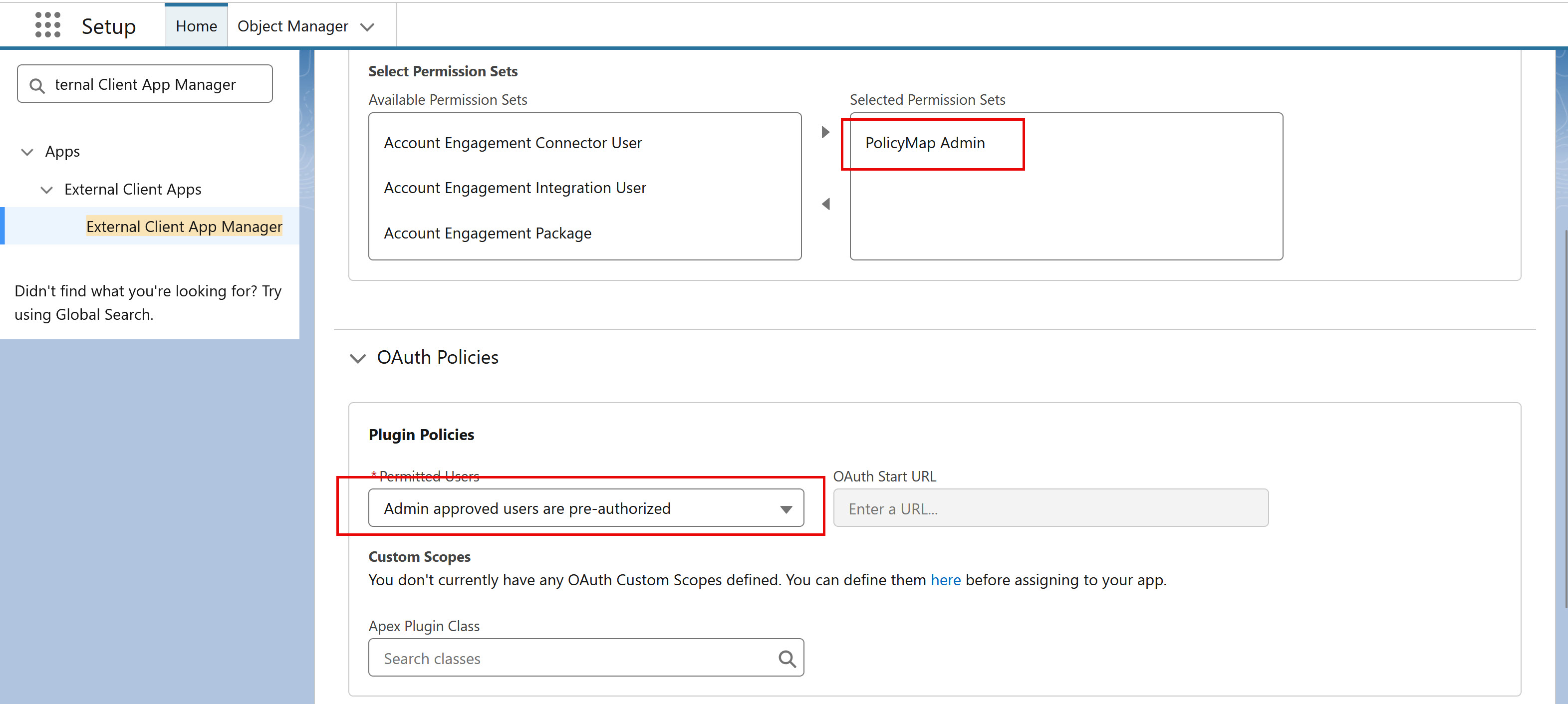
- Confirm the change and save the policies.
- Manage access to the PolicyMap Services app. From Setup, in the Quick Find box, enter External Client, and then select External Client App Manager.
- Go to the PolicyMap Administration and Settings page.
- On the Set PolicyMap data and geocoding specs tab, select the objects you had enabled before, as well as any newly-available objects and related objects.
- On the Import and Organize PolicyMap Data tab, select the data you had before. You may also reorder the data fields on this page. Import the data.
- Add the new PolicyMap components to your selected record pages.
IMPORTANT: Add a Component Visibility filter to all components (and component tabs) added to pages in the Lightning App Builder. The Custom Permission “Access_PolicyMap” must equal true. This ensures only PolicyMap users will see PolicyMap components.
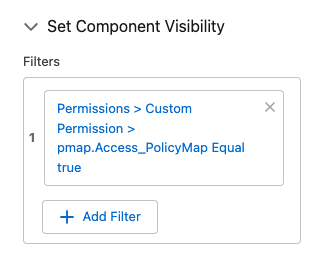
- Add the PolicyMap Index Card component to the record page layouts enabled in Settings. This displays the PolicyMap data for the location associated with each single record. Wide container preferred.
- Add the PolicyMap Record Locator component to the record page layouts enabled in Settings. This displays the PolicyMap data for the location associated with each single record. Narrow container preferred.
- Recreate your reports using the new PolicyMap Data object
